Wanderlust Interactive · Point-and-click adventure
The Pink Panther: Passport to Peril
The Pink Panther, secret agent, travels to six countries to save Camp Chilly Wa-Wa in this 1996 adventure, with a PDA packed with facts about each culture.
Point-and-click adventure by Wanderlust Interactive (1996) for PC, in Spanish. Available to download.
4.1 20 votes
THE CLABA ARCHIVE
Inside the game.
Its history, its ideas and the reasons to come back.
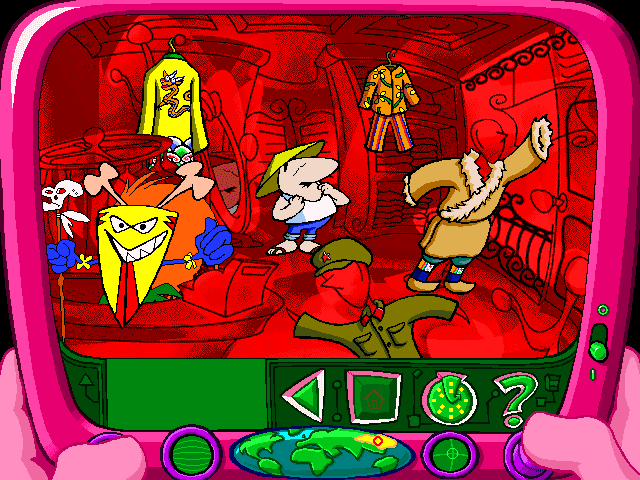
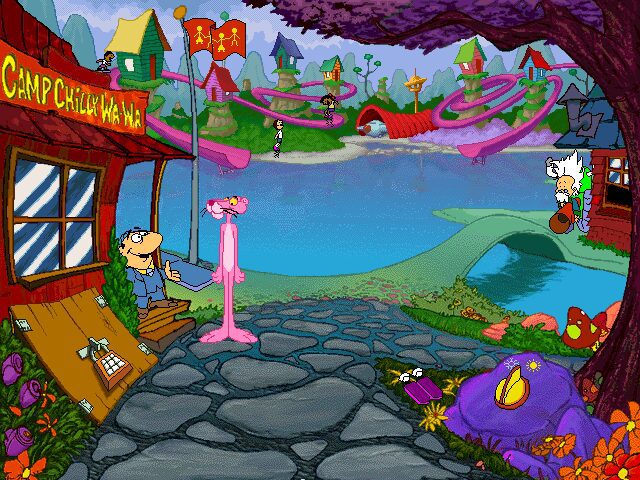
The Pink Panther had always sorted out his messes without saying a word. In this 1996 adventure he not only talks: he works as a secret agent for the Inspector and has to travel around the world to save a summer camp on which, no less, world peace depends. The Pink Panther: Passport to Peril, which was released in Spain as La Pantera Rosa en Misión Peligrosa, is a point-and-click adventure from Wanderlust Interactive designed for the whole family, with a good dose of travel encyclopedia.
A very unusual camp
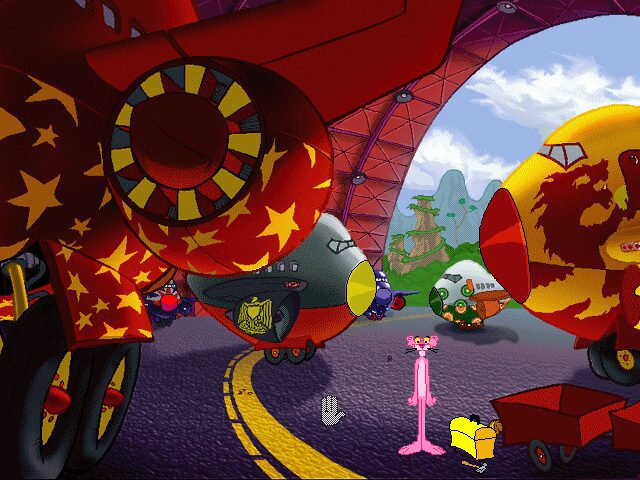
Chilly Wa-Wa is no ordinary camp: the gifted children of very powerful people spend the summer there, and if the kids go home upset, an international conflict could break out. The Panther arrives on a secret mission to make sure everything runs smoothly, reunites with his friend the scientist Von Schmarty and his inventions, and soon discovers that the Dogfather and his henchmen, Pugg and Louie, are lurking around with bad intentions. When the kids start behaving very strangely, it is time to investigate in their home countries: England, Egypt, China, Bhutan, India and Australia, with stops in cities such as London, Cairo, Beijing or Bombay and walks through the Himalayas.
How to play
Everything is done with the mouse. A left click takes the Panther to an object or a character, and a click on himself opens the pocket in his fur, where he keeps what he finds. The right button is for getting information: whatever you point at is commented on by the PDA, the «Pink Digital Assistant» that Von Schmarty gives him, and if there is more data its icon appears in the lower left corner. The puzzles are simple, mostly about getting an object and giving it to whoever needs it, and the game doesn’t punish you for trying things.
An adventure that teaches geography
The PDA is half the game. It gathers photos and texts about the people and languages, clothing, food, art and entertainment, history, nature and religion of each country, and each topic is presented by a cartoon character: the Inspector, for example, handles history from an excavation site, and Von Schmarty, religion. On top of that come original songs by Jared Faber, with lyrics by Emily Kapnek, who also wrote the story and the script. They talk about the Taj Mahal, mummies, Bhutan or Guy Fawkes Night, and even got their own album in 1997. The German box also boasted a 1996 EMMA award. Its sequel is The Pink Panther: Hokus Pokus Pink, also from Wanderlust.
The edition we offer
This is the Spanish-language edition. In Downloads you have two options: a repack to install and play, labeled for Windows XP, 7 and 10, which is the recommended one, and the original CD image, labeled for Windows XP. As the note in the forum (in Spanish) warns, the CD cannot be installed on 64-bit systems; the repack can, and in the forum it was confirmed to work both windowed and in full screen. For the CD, the practical option is a 32-bit Windows or a virtual machine like the one in our tutorial on 86Box with Windows 98.
In Guides you have the installation, the controls and some advice so you don’t get lost at the camp; in Tips & tricks, how to use the game’s own hints, because it has no codes. If you are left wanting more interactive cartoons, try Toonstruck or Hollywood Monsters.
EVERY PIXEL COUNTS
The game in pictures.
Explore the screenshots and open every detail at full size.
GET READY FOR YOUR NEXT GAME
Choose your download.
Format, compatibility and server. All in view.
Download Repack
COMPATIBILITYWindows XP / 7 / 10 ✓ At no cost✓ No sign-up Download www.mediafire.com · New tab MediaFire02 ISODownload ISO
COMPATIBILITYWindows XP ✓ At no cost✓ No sign-up Download www.mediafire.com · New tabClicking opens the CLABA loading area and, in a few seconds, your download. If a link fails, let us know via Contact or in the forum.
THE SECRET SIDE OF THE GAME
Tips, tricks and secrets.
A hint at the right time. A code that changes everything.
Tip · no codes, but there are hints
The game has no cheat codes. What it does have is a hint system: move the mouse to the top edge of the screen so the menu bar appears and open Help. There, the hints option gives you help in the form of a poem. The manual recommends using it only when you are in a pinch.
Tip · right-click everything
The right button costs you nothing and tells you what each thing is. If the PDA icon appears in the lower left corner, click it: there are photos and facts that sometimes give the key to what a character needs.
Tip · try objects without fear
Open the pocket by clicking on the Panther, choose an object and pass it over characters and things. If it glows yellow, it can be used there. If it doesn’t work, click on the Panther again to put it away: there is no penalty for getting it wrong.
Tip · repeat what they tell you
The R key (or the left arrow) repeats the last line. Use it before moving on: many hints are in the dialogue. Space cuts dialogue short, but the manual warns that you might miss something important.
Tip · look for the arrows
When the cursor turns into a big arrow, you can leave the scene in that direction. If you get stuck, run the mouse along the edges of the screen: sometimes the exit you are looking for is there.
Tip · save before every trip
From the top menu you can save under a name. The files have the extension .ptp and are kept in the game folder; double-clicking one opens it directly.
No matches. Try another effect or code.
THE NEXT STEP, CLEARER
Guides to move forward.
From the first installation to that mission that won't give in.
Start here · first launch
- Download the repack from Downloads: it is the recommended option and is labeled for Windows XP, 7 and 10.
- Install it in a short path such as
C:\Juegos\PanteraRosa, outsideProgram Files. - Launch it. The introduction can be skipped with Esc from the second time on.
- Your save games are stored in the game folder: if you reinstall or change machines, make a copy first following our tutorial on how to copy and restore save games.
The CD image is for preserving the original edition. According to the note in the forum (in Spanish), it cannot be installed on 64-bit systems: you need a 32-bit Windows, a period PC or a virtual machine (see our tutorial on 86Box with Windows 98). Also, the game requires the CD to be in the drive while playing. For other compatibility problems there is the tutorial on Windows XP classics on Windows 10 and 11.
Controls
- Left click: walk to an object or character and interact.
- Left click on the Panther: opens the pocket with the objects. The paw prints turn the page.
- Right click: PDA information about what you point at.
- Esc: skips animations you have already seen, the introduction and transitions.
- Space or right arrow: cuts off the current line.
- R or left arrow: repeats the last line.
- P: pause. F1: help.
The menu bar, with save, load, volume, PDA and help, appears when you move the mouse to the top edge. The cursor changes shape: a glowing hand means you can interact, a clock means the game is loading and a big arrow marks an exit.
First steps
- At Chilly Wa-Wa, talk to everyone: the kids, the counselor and Von Schmarty. Each kid comes from one of the six countries, and what they tell you says where you will have to go.
- Pick up everything you can: the Panther’s pocket is bottomless.
- Before each trip, save the game under a name that tells you where you are.
- In each country, explore every screen and use the right click to learn about the place: many puzzles consist of getting what someone needs so that they will help you.
- When you return to the camp between trips, pay attention to what has changed.
In the PDA, the navigation page has two wheels, one for countries and one for topics: spin them and press the arrow to go straight to what you are looking for. To return to the game, pull the lever on the Panther’s thumb.
Technical notes
It is a Windows 3.1 and Windows 95 game. It required a 486 at 66 MHz with 8 MB of RAM (a Pentium with 16 MB was recommended), a 640 × 480 screen in 256 colors, a double-speed CD-ROM drive, a sound card and about 10 MB of hard disk space. The rest of the data is read from the CD during play.
On a current machine, the convenient route is the repack, which was tested in the forum (in Spanish) windowed and in full screen. The game’s online menu, which opened the official website and the winners page, points to addresses that no longer exist.
Sources
- Internet Archive · German Ravensburger edition with its manual: requirements, controls, PDA, menus, .ptp save games, hints, credits, EMMA award on the box and the manual’s tone.
- Internet Archive · US edition and another copy with a description: developer, premise and countries.
- Internet Archive · original soundtrack (1997): songs, authors and label.
- GameFAQs · release data: publisher and date in the United States.
- Pink Panther Wiki: plot, characters and the talking Panther, based on the 1993 series.
- German, Dutch, Danish, Norwegian and Russian editions preserved on the Internet Archive: translations.
Something wrong?
Give us a hint.
A broken link, a detail to correct or a game that won't start. Your report helps keep this game page up to date.
Get in touchReport an issue with this game Discuss it in the forumCLABA ARCADE ROOM
251 classics
without installing anything.
Don't feel like installing? These play right in your browser.
Enter the roomTHE CLABA APP1.0 RC 1
Take the archive
with you.
Game pages, online play and your shelf on Android. Free, no sign-up.
ARCHIVE SECRETS
Did you know?
A talking panther. In the classic shorts the Pink Panther was mute. This game is based on the 1993 TV series, in which the character did talk, and here he talks throughout the whole adventure.
Its own album. The songs by Jared Faber and Emily Kapnek came out on CD in 1997 with ten tracks: a version of Henry Mancini’s theme and others devoted to Bhutan, the Taj Mahal, mummies, Guy Fawkes Night or the Indian caste system.
Award-winning. The box of the German edition, published by Ravensburger in 1997, carried the seal of an international EMMA award winner from 1996.
A manual that doesn’t self-destruct. The German edition’s manual plays at being a secret file: it asks you to read it, memorize it and discreetly dispose of it, and clarifies that it will not destroy itself.
It traveled across half of Europe. It was translated into German, Dutch, Danish, Norwegian and Russian, in addition to Spanish.