Telstar · Point-and-click adventure
Fable
A 1996 point-and-click adventure with hand-painted backdrops: Quickthorpe crosses four lands for four gems held by monsters. Spanish version, repack and CD.
Point-and-click adventure by Telstar (1996) for MS-DOS, in Spanish. Available to download.
3.8 5 votes
THE CLABA ARCHIVE
Inside the game.
Its history, its ideas and the reasons to come back.


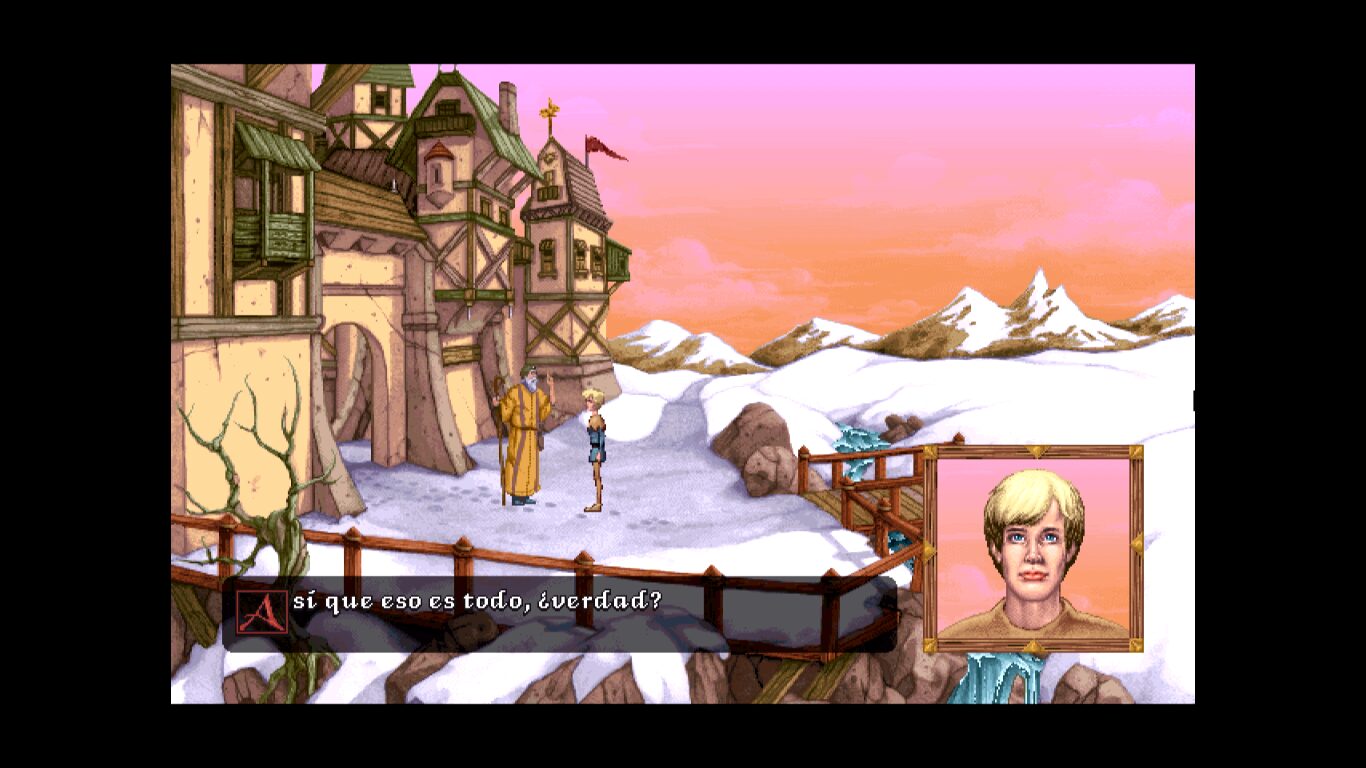
A village boy, an old man who sends him to kill four monsters, and a list of items taken from a sleeping witch’s pantry. That is how Fable begins, the only adventure ever published by the small studio Simbiosis Interactive. It came out in 1996 with hand-painted backdrops and voices in all the dialogue, and it has nothing to do with Lionhead’s Fable, which would arrive eight years later.
Four gems and a broken world
The manual tells it like a fable. Centuries ago, the Mecubarz, astral beings shaped like spheres of light, ruled the world of Balkhane. An ambitious priest, Ismael, conspired with four accomplices to steal their power; the punishment was a cataclysm that split the planet into four lands ruled by ice, mist, water and fire. The conspirators were turned into monstrous guardians of four gems: an emerald, a diamond, a sapphire and a ruby.
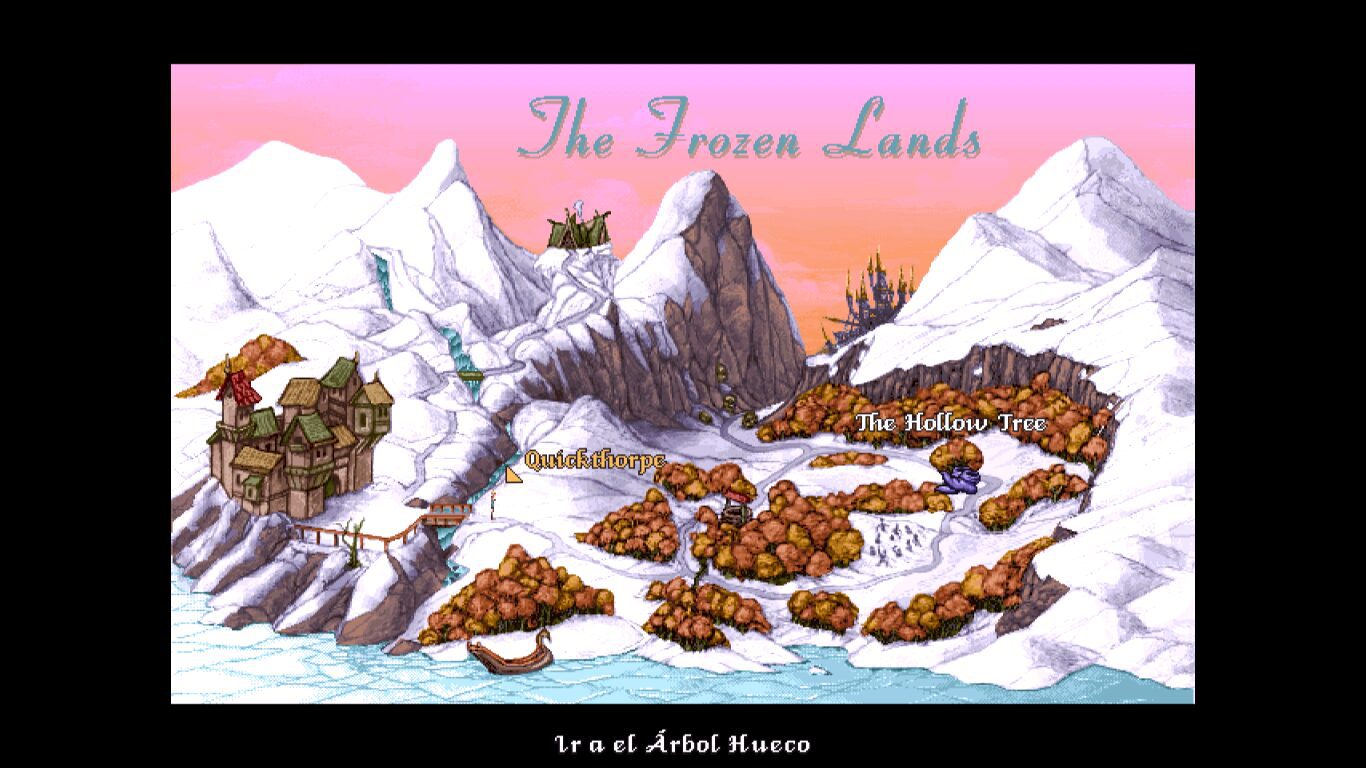
That is where Quickthorpe comes in, a young man from the village of Balkhane who is sent to recover the gems. The journey crosses the Frozen Lands, the Land of Mists, the marshes and the Land of Shadows, and along the way you meet a thief knight, a trapped fairy, a mermaid and a serpent king. And, little by little, the suspicion that someone is using the protagonist.
How it plays
It is a classic point-and-click graphic adventure, in the style of King’s Quest, the series the press of the time compared it to. There is no verb list on screen: the cursor changes shape depending on what is under it, the right button cycles through the possible actions (look, talk, use, take) and the left button carries them out. The space bar opens the inventory, and items are combined by dragging them onto one another. Once an area is solved, a single click on the destination is enough for Quickthorpe to cross several screens at once.
Unlike many adventures of the time, here you can die: stepping on the wrong bridge or touching what you should not ends the game, so it pays to save often.
Pretty, odd and with a controversial ending
Reviews praised the scenery and the voices and criticized the unoriginal puzzles, a somewhat clumsy interface and an anachronistic humor that did not always fit the fairy-tale tone. What got talked about most was the ending: the original, very dark, went over so badly that Sir-Tech asked for a gentler one for the North American edition. Outside North America, where Telstar Electronic Studios distributed it, it was sold with the original ending.
All the same, it has the charm of those mid-nineties adventures that bet on hand-drawn art just as the industry was moving over to video and 3D. If you like Simon the Sorcerer, The Legend of Kyrandia or Discworld, here you will find another fantasy with a mean streak.
The edition we offer
This is the Spanish version. The original CD contained both versions: the installer set up the MS-DOS or the Windows 95 version depending on where it was launched from. In Downloads you have two options: a repack ready to install and play, flagged for Windows XP, 7 and 10, and the CD image for anyone who wants to preserve it or install it in DOSBox, as we explain in DOSBox from scratch (in Spanish).
In Guides you will find the first launch, the controls and the first steps through the Frozen Lands; in Tips & tricks, advice for not dying before your time, because the game has no known codes.
EVERY PIXEL COUNTS
The game in pictures.
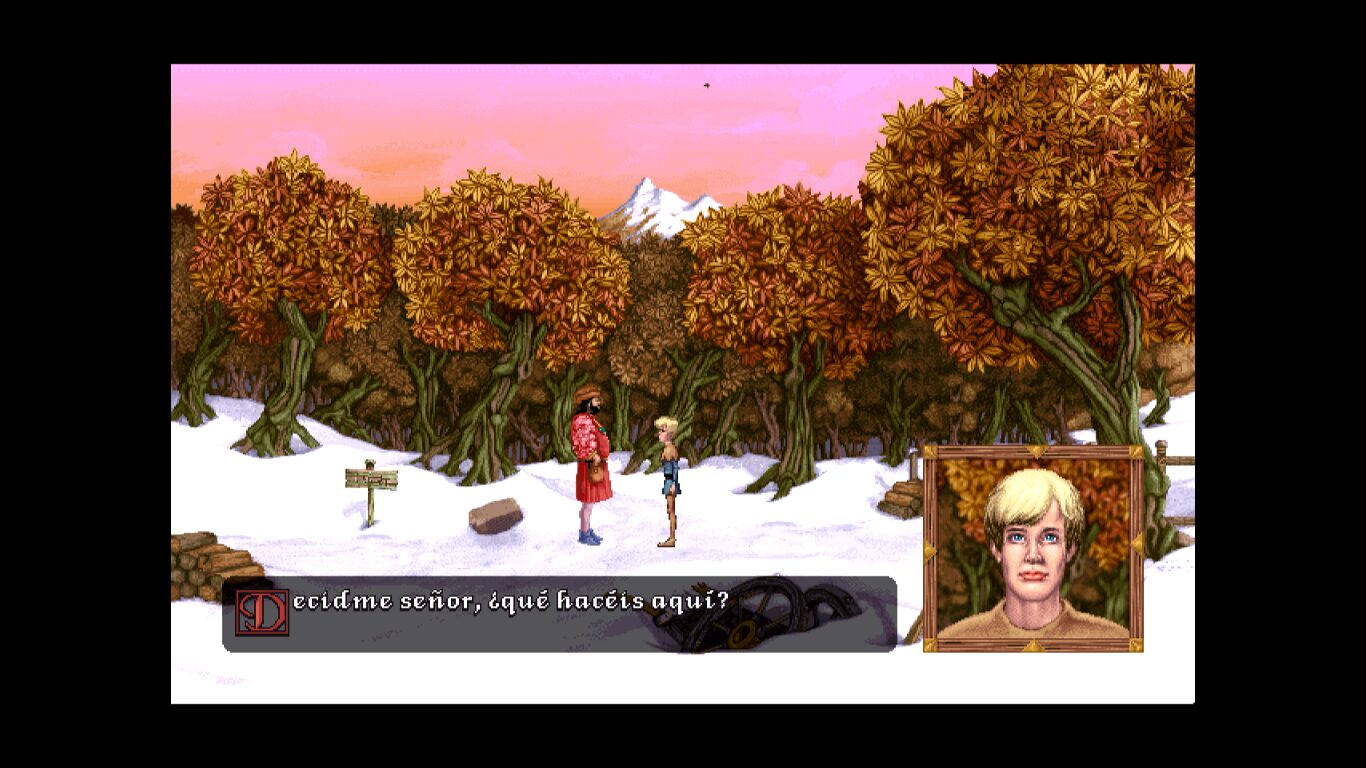
Explore the screenshots and open every detail at full size.
GET READY FOR YOUR NEXT GAME
Choose your download.
Format, compatibility and server. All in view.
Download Repack
COMPATIBILITYWindows XP / 7 / 10 ✓ At no cost✓ No sign-up Download www.mediafire.com · New tab MediaFire02 ISODownload ISO
COMPATIBILITYMS-DOS 6.22+ ✓ At no cost✓ No sign-up Download www.mediafire.com · New tabClicking opens the CLABA loading area and, in a few seconds, your download. If a link fails, let us know via Contact or in the forum.
THE SECRET SIDE OF THE GAME
Tips, tricks and secrets.
A hint at the right time. A code that changes everything.
How to use them · no codes
No reliable cheat codes are known for Fable: neither the manual nor Sir-Tech’s official guide mentions any. What follows is advice drawn from that guide and the manual so that Quickthorpe’s journey does not end before its time.
Tip · save before every risk
When Quickthorpe dies, the game does not make it clear: he just stands still. Press Esc to go back to the title screen and use Restore Game. Save in several different slots before touching anything suspicious.
Tip · look twice
When you examine an object, an enlarged view appears in which you can look again. That is how hidden things are found: examine the chair in the boat on the frozen lake closely and Simbeline appears, a spirit who will give you something essential.
Tip · the stream bridge
In the Frozen Lands, do not step on the wooden bridge: it collapses and Quickthorpe freezes to death. Cross by jumping across the stones in the streambed.
Tip · the sleeping witch
In the old house, the witch Welda is asleep. You do not need to talk to her, and it is better not to: quietly take what you need from the house and the cellar. The ghost cat at the entrance is scared off by the medallion the village elder gives you.
Tip · the blue fruit
Inside the hollow tree there is a blue fruit that leaves Quickthorpe stunned if he takes it unprotected. First get the thief knight’s gloves (in exchange for the necklace from the nest) and put them on.
No matches. Try another effect or code.
THE NEXT STEP, CLEARER
Guides to move forward.
From the first installation to that mission that won't give in.
Start here · first launch
- In Downloads, the easy route is the Spanish repack, flagged for Windows XP, 7 and 10: install and play.
- Install it in a short path without spaces, such as
C:\Juegos\Fable, outsideProgram Files. - If you prefer the CD image, unzip it and mount it in DOSBox with
imgmount d C:\Juegos\FableCD\fable.iso -t iso(replace the name with that of the actual file). Then create a game folder mounted asC:, switch toD:and typeINSTALL. - The installer offers three sizes: minimum (about 2 MB), medium (7 MB) and maximum (30 MB). Choose the maximum: the game will read less from the CD and run more smoothly.
If you have never used DOSBox, start with DOSBox from scratch (in Spanish); to carry it on a USB stick, see how to create a portable game with DOSBox. And before reinstalling, back up your save games by following this tutorial (in Spanish).
Controls
- Right button: changes the cursor action (walk, look, talk, use, take, use object with, give object to). Only the actions possible at that spot appear.
- Left button: carries out the action shown. The text line at the bottom confirms what you are about to do.
- Space bar (or looking at Quickthorpe): opens and closes the inventory.
- To combine or give an object, pick it up from the inventory, move it over the target and press the right button until «Use… with…» or «Give… to…» appears.
- Esc: returns to the title screen (new game, load, introduction, quit). In menus, Esc or the right button cancels.
- With an area already solved, click on the far destination and Quickthorpe will head straight there.
First steps · the Frozen Lands
- Talk to the old man of Balkhane: he explains the mission and gives you a medallion.
- By the stream, cross over the stones, never over the bridge.
- In the old house, use the medallion on the ghost cat. Inside and in the cellar there is a rune book, birdseed, a gold figurine and a rope.
- At the frozen lake, examine the boat’s chair closely and talk to Simbeline.
- Give the figurine to the knight at the edge of the forest to get past; with the birdseed you will distract the bird in the hollow tree and find a necklace.
The general rule: examine everything twice, pick up everything and save before any danger.
Technical notes
Original requirements: 486 processor, 8 MB of RAM, an SVGA card compatible with VESA 1.2, double-speed CD-ROM, mouse and MS-DOS 5.0 or Windows 95. Under DOS it supported Sound Blaster and compatibles, Gravis Ultrasound, Microsoft Sound System and many other cards.
The Windows 95 version used DirectX; on a current Windows the safest choice is the DOS version inside DOSBox, which already provides VESA-compatible SVGA. If the setup program asks for your sound card and you are playing in DOSBox, choose Sound Blaster 16 (in DOSBox, port 220, IRQ 7, DMA 1).
Sources
- German Fable manual, PC Games 3/99 edition (Internet Archive): requirements, DOS/Windows 95 installation, installation sizes, the story of the Mecubarz and controls.
- Fable: The Official Hint Guide, Sir-Tech 1997 (Internet Archive): authors, locations and items of the Frozen Lands, tips.
- GameSpot · February 1997 review: score, deaths without warning, endings of the British version and Sir-Tech’s change.
- Adventure Game Hotspot: Simbiosis’s only game, book-shaped box, ending changed in the US.
- Retro365: Telstar as international publisher and Sir-Tech in North America, MS-DOS and Windows 95 edition.
- Fable package with DOSBox (Internet Archive): the DOS version works with DOSBox on Windows 11.
Something wrong?
Give us a hint.
A broken link, a detail to correct or a game that won't start. Your report helps keep this game page up to date.
Get in touchReport an issue with this game Discuss it in the forumCLABA ARCADE ROOM
251 classics
without installing anything.
Don't feel like installing? These play right in your browser.
Enter the roomTHE CLABA APP1.0 RC 1
Take the archive
with you.
Game pages, online play and your shelf on Android. Free, no sign-up.
ARCHIVE SECRETS
Did you know?
One studio, one game. Fable was the first and only release from Simbiosis Interactive. In North America it was published by Sir-Tech, the publisher of Wizardry and Jagged Alliance, and in the rest of the world by Telstar Electronic Studios.
Two endings depending on the continent. The original ending, with Quickthorpe celebrating his 21st birthday in a cell, was considered too gloomy and Sir-Tech replaced it with a happy ending in the North American edition only.
A box that was a book. The packaging was designed as an illustrated volume, and the game itself starts by opening a book at its first chapter.
A hint guide with a sense of humor. Sir-Tech’s official guide (1997), by Charles Miles and Luis Salazar, boasts that it lets you «cheat like crazy» and jokes that they had to pull the mermaid’s centerfold poster at the last minute.
A magazine giveaway. In Germany it ended up as a complete game on the cover CD of the March 1999 issue of PC Games, along with the pinball game Slam Tilt.